Naive Simple Flowers Seamless Patterns
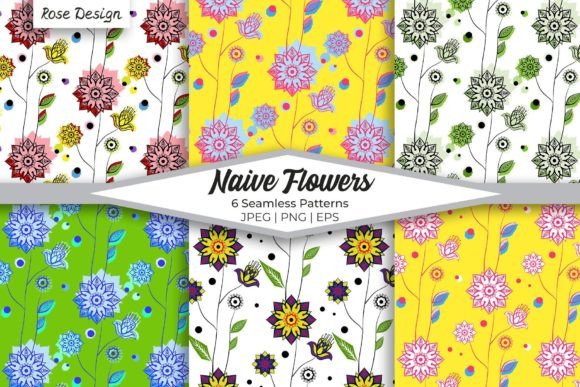
Naive Simple Flowers Seamless Patterns are a curated set of six original, hand-crafted designs rooted in an abstract naive aesthetic—think bold outlines, playful asymmetry, and unrefined botanical charm. These aren’t algorithmically generated motifs or AI-styled approximations. They’re intentionally imperfect, expressive, and grounded in human gesture—ideal for creators who value authenticity over polish. The patterns repeat cleanly at any scale, making them truly seamless across surfaces, substrates, and resolutions.
What makes this collection distinct is its balance of simplicity and versatility. Each pattern features stylized flowers and organic shapes that avoid realism while retaining recognizability—so they read instantly as floral, but never compete with foreground content. That clarity matters when layering text, applying embroidery, or printing on fabric: the background stays supportive, not distracting.
How Naive Simple Flowers Seamless Patterns Fit Into Real Creative Workflows
These patterns rarely sit alone—they’re assets that move through stages: planning, production, refinement, and deployment. For example, a small business owner designing branded gift wrap begins by selecting a pattern that matches their brand’s warmth and approachability. That choice informs paper stock, ink selection, and even packaging dimensions—because knowing the repeat size (5000×5000 px) helps anticipate how much of the design will appear on a 12×12 inch sheet before cutting.
A textile designer uses the EPS10 vector files to scale motifs precisely for screen printing on cotton jersey. Unlike raster-only sets, the vectors allow resizing without pixelation—even when adapting a single bloom from the pattern into a standalone embroidery motif. That cross-format flexibility means one purchase supports multiple output paths: print, web, cut files, or digital mockups—without needing separate licenses or conversions.
For educators building printable classroom resources, the PNG files with transparent backgrounds integrate cleanly into Canva or Google Slides. No need to mask or crop—just drag, resize, and overlay lesson headers or student instructions. The consistent 5000×5000 px resolution ensures crisp output whether projecting on a smartboard or printing double-sided handouts.
Practical Integration Across Tools and Platforms
Compatibility starts with file structure—not assumptions. The 18 total files (6 JPEG, 6 PNG, 6 EPS10) are named consistently and organized by format, not theme or color. That saves time when scripting batch exports in Adobe Illustrator or automating folder-based asset management in Figma libraries. You don’t need to rename or re-sort before importing into your design system.
When using these patterns in Adobe Photoshop for scrapbooking templates, open the JPEGs first for quick previews—then switch to PNGs when layering over photos or gradients. The transparency eliminates manual erasing or blending modes. In Affinity Designer, the EPS10 files import with editable paths and live color swatches, letting you adjust the palette to match Pantone references before sending to a print vendor.
For branding teams building style guides, these patterns function as texture anchors—not just decoration. A soft coral bloom repeated at 15% opacity becomes a subtle background for email headers; enlarged and recolored in charcoal, the same motif works as a watermark on PDF reports. Because all six patterns share the same naive language (same line weight, similar negative space rhythm), mixing them feels intentional, not chaotic.
Preparation and Setup Best Practices
Before launching into a project, spend five minutes auditing your intended use cases. Ask: Will this be printed? At what scale? On what material? Will it appear digitally—and if so, on light or dark UI backgrounds? That determines which file type to prioritize. Print projects benefit most from the high-res JPEGs for CMYK soft proofing; web interfaces rely on PNGs for responsive scaling; vector-based product mockups (like tote bags or notebooks) require the EPS10 files for distortion-free warping.
Store the files in a dedicated, versioned folder—label it clearly (e.g., “Naive-Flowers-Seamless-v1”) and include a plain-text README listing each pattern’s name, dominant hue family, and recommended use context (e.g., “Pattern_03 – Warm terracotta + sage – best for gift tags and fabric”). This avoids digging through thumbnails later when deadlines tighten.
Workflow Examples Across Roles
- Freelance graphic designer: Uses Pattern_02 (a loose daisy cluster) as a base for a client’s stationery suite. Applies it as a duotone overlay in InDesign, then exports layered PDFs for letterpress quoting—knowing the EPS10 ensures engravers receive clean vector data for plate creation.
- Small-batch ceramicist: Imports Pattern_05 (a looping vine motif) into Procreate, traces key curves with a textured brush, then laser-etches the simplified line art onto mug glazes. The original seamless repeat gives her flexibility to isolate segments without visible seams.
- Blog content creator: Adds Pattern_01 as a subtle background to Pinterest pin templates in Canva. Sets blend mode to “Multiply” so text remains legible over the floral shapes—no contrast adjustments needed thanks to the balanced midtone density.
- Nonprofit event planner: Prints Pattern_04 on kraft paper for table runners at a spring fundraiser. Orders test swatches first—confirming the JPEG renders accurately on uncoated stock before committing to full rolls.
Long-Term Usability and Quality Control
Because these are high-definition files—not compressed web previews—you retain flexibility years later. A pattern used for a 2024 wedding invitation can scale up to a 4×8 ft banner for a future anniversary party without degradation. That longevity reduces asset sprawl: instead of hunting for “similar but bigger” patterns every time needs evolve, you reuse the same trusted source.
Quality control happens early: verify seamless tiling in your software before finalizing layouts. In Photoshop, use Filter > Other > Offset with horizontal/vertical values set to half the canvas size (2500 px) to expose any misaligned edges. If none appear, the repeat is truly seamless—no post-processing required.
Consistency across applications also depends on color management. Embed ICC profiles when opening JPEGs in professional tools; for web use, convert PNGs to sRGB before uploading. The naive style’s limited palette (typically 3–5 core hues per pattern) makes global color shifts straightforward—change one swatch in Illustrator, and the entire pattern updates.
Finally, consider licensing scope. These patterns are royalty-free for both personal and commercial use—including physical products like apparel, stationery, and home goods. That means no tracking usage metrics, no renewal fees, and no legal overhead when scaling from Etsy listings to wholesale catalogs. It’s infrastructure, not decoration.
Naive Simple Flowers Seamless Patterns work best when treated as working components—not static images. They gain value through repetition, adaptation, and integration. Whether you’re sketching a logo concept, prepping a fabric bolt for sampling, or building a mood board for a client pitch, these patterns offer reliable visual grounding—unobtrusive enough to support your message, distinctive enough to hold attention.