Flowers Vintage Patterns Digital Papers
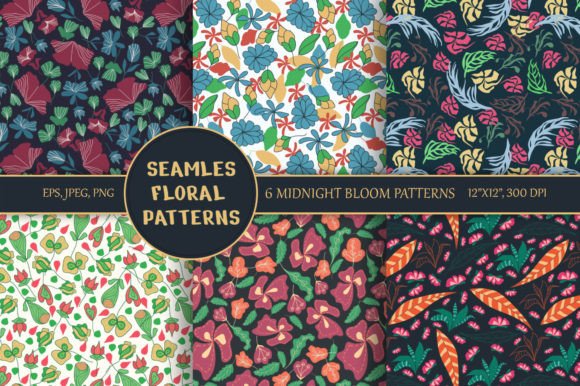
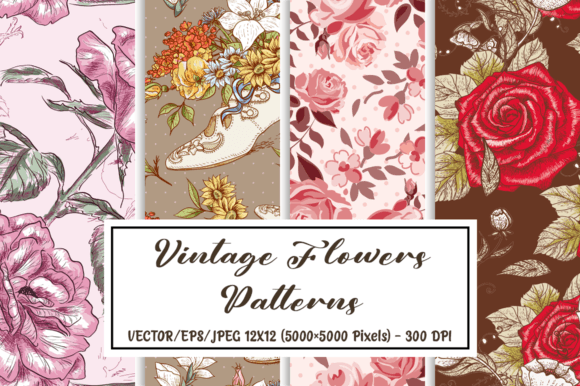
If you’ve ever spent hours searching for authentic, high-resolution floral motifs that don’t look mass-produced or overly saturated—then Flowers Vintage Patterns Digital Papers is worth your attention. This curated set of 8 vintage-inspired patterns delivers more than just visual charm: it offers professional-grade flexibility, historical texture, and seamless integration across both print and digital workflows.
What Makes These Patterns Stand Out
Unlike many “vintage-style” assets that rely on filters or low-res scans, this collection was built from the ground up with authenticity and utility in mind. Each pattern is delivered in two formats: vector EPS (fully editable in Illustrator, Affinity Designer, or CorelDRAW) and high-fidelity JPEG (5000×5000 pixels, 300 DPI, 12×12 inches). That means you’re not just getting pretty pictures—you’re getting production-ready files that scale infinitely without pixelation, retain crisp detail for letterpress or foil stamping, and hold up beautifully on fabric mockups or packaging prototypes.
The floral motifs themselves draw from late 19th- to early 20th-century botanical illustration traditions—think delicate trailing vines, soft cabbage roses, subtle chintz repeats, and muted daisies with gentle shading. Colors are intentionally desaturated and grounded, avoiding neon brightness or harsh contrast. That restraint makes them unusually versatile: they pair effortlessly with serif typography for editorial layouts, complement minimalist branding without competing, and add warmth to educational materials without overwhelming young readers.
Real-World Uses Across Disciplines
Designers aren’t the only ones who benefit. Here’s how different professionals apply Flowers Vintage Patterns Digital Papers in practice:
- Small business owners use the EPS files to create custom wrapping paper, thank-you cards, and product labels—especially for artisanal goods like candles, soaps, or preserves where heritage aesthetics reinforce brand story.
- Educators and curriculum designers incorporate the JPEG versions into printable worksheets, reading comprehension handouts, or classroom bulletin board backdrops—adding visual interest without distracting from learning objectives.
- Bloggers and content creators layer patterns behind quote graphics or podcast episode thumbnails, using blending modes in Canva or Photoshop to mute intensity while preserving texture.
- Freelance stationery designers build entire wedding suites by combining one pattern as a background, another as a border element, and a third as a subtle watermark behind monograms—thanks to the consistent 12×12 inch repeat size.
- Marketers running email campaigns apply a light overlay of one pattern (at 5–10% opacity) to hero images, creating cohesion across a seasonal campaign without needing custom photography.
Why Resolution and Format Matter More Than You Think
That 5000×5000 pixel JPEG spec isn’t arbitrary. It gives you room to crop tightly for social media avatars, zoom in for large-format wall prints, or downsample confidently for web use—all while retaining clarity. Meanwhile, the vector EPS files let you recolor individual petals, adjust spacing between repeats, or isolate single blossoms to use as standalone icons. One user recently shared how she extracted a single climbing vine motif, reversed its direction, and embedded it into a client’s logo mark—something impossible with raster-only assets.
Note: While these files work in most design software, verify compatibility before purchase. Adobe Creative Cloud users will find full support out of the box. Affinity users should confirm EPS import settings (some versions require enabling legacy support). Free tools like Inkscape handle the vectors well, but may render subtle gradients differently—always test a small section first.
Practical Tips for Getting the Most From the Set
You don’t need to use all eight patterns at once—and you shouldn’t. Start with one that matches your project’s emotional tone: a soft rose pattern for wellness branding, a tighter geometric floral for modern stationery, or a looser, sketch-like bloom for creative portfolios.
When applying patterns to text-heavy documents, reduce opacity to 15–25% or use them only in headers and dividers. Overuse can hurt readability and accessibility—especially for users with dyslexia or visual processing differences.
For commercial projects, check the license included with your purchase. Most reputable vendors grant broad usage rights—including resale in physical products like notebooks or fabric—but prohibit redistribution of the raw files or claiming authorship of the original designs. When in doubt, contact the creator directly. Transparency here reflects professionalism on both sides.
How These Patterns Fit Into Broader Design Trends
Vintage floral motifs are resurging—not as nostalgia bait, but as intentional counterpoints to digital minimalism. In a landscape dominated by sharp edges, bold sans-serifs, and algorithm-driven feeds, subtle organic repetition signals care, craft, and continuity. That’s why educators choose them for inclusive classroom visuals, why therapists use them in calming handouts, and why sustainable brands lean into their tactile, analog feel.
But avoid treating them as decorative wallpaper. The strength of Flowers Vintage Patterns Digital Papers lies in how thoughtfully they’re deployed: as rhythm, not noise; as context, not clutter. A single well-placed repeat can suggest heritage without saying a word—making your message land faster and linger longer.
A Final Note on Selection and Intention
Not every vintage floral pattern earns its place in your toolkit. Some lack tonal consistency across the set. Others repeat too aggressively or clash with common CMYK printing profiles. What sets this collection apart is its internal harmony—the way each pattern shares similar line weight, color depth, and spacing logic. That cohesion saves time during layout and reduces decision fatigue when building multi-element assets.
If you’re evaluating similar offerings, compare preview thumbnails at actual size (not zoomed out), open one file in your preferred editor to test responsiveness, and ask whether the motifs feel distinct enough to serve separate purposes—or if they blur together after five minutes of use. Trust your eye, but also trust real-world performance over aesthetic first impressions.
Ultimately, Flowers Vintage Patterns Digital Papers works because it respects your time, your standards, and your audience’s experience—whether you’re designing a conference badge, illustrating a children’s book, or refreshing a decade-old website. It doesn’t shout. It supports. And in today’s crowded visual landscape, quiet reliability is rare—and valuable.